CPU and GPU
hdfe_stream has two experimental GPU options: device="cuda" runs the solve on
an NVIDIA GPU, through CuPy, and polars_engine="gpu" runs the fit’s Polars
queries on the cudf-polars GPU engine. This benchmark measures what they buy,
on the AKM regression
(log_earn ~ age_squared + age_cubed | worker_id + firm_id + year, clustered
by worker, 25,000 to 5,000,000 workers), on one machine with an NVIDIA H100,
against the two other libraries with a GPU path:
pyfixest’s LSMR demeaner, on its
default CPU backend and on PyTorch on the GPU, and
xhdfe, on its CPU and CUDA
backends. Every library on the CPU is the reference point for itself on the
GPU, on the same machine. All seven configurations agree on the coefficients
to within 2e-10 at every size.
python benchmarks/gpu_benchmark.py      # on a machine with an NVIDIA GPU
python benchmarks/plot_benchmarks.py
The numbers are in benchmarks/results/gpu.csv.
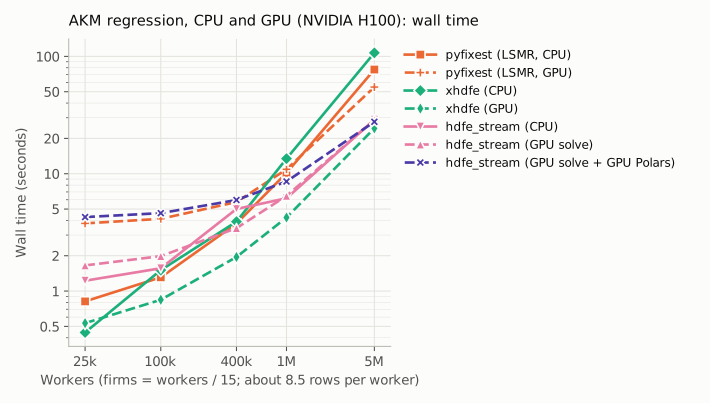
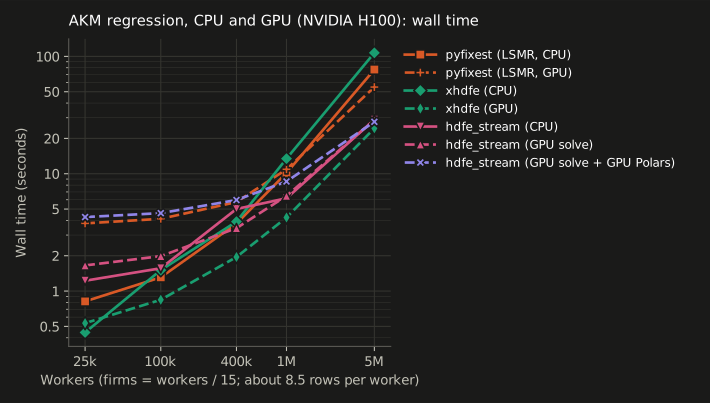
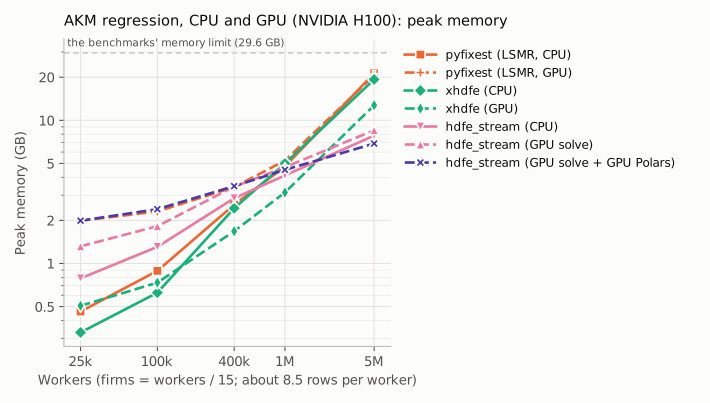
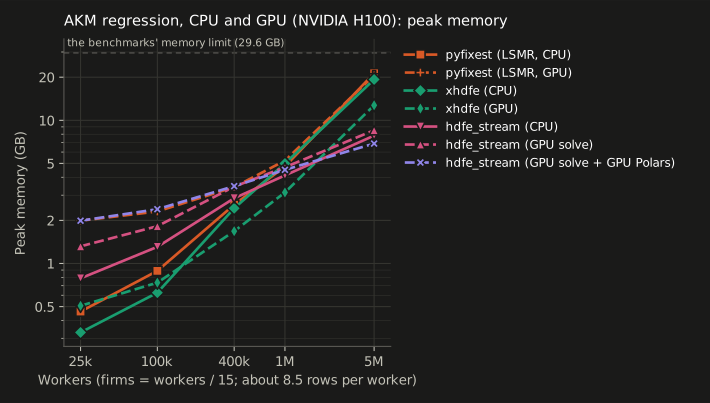
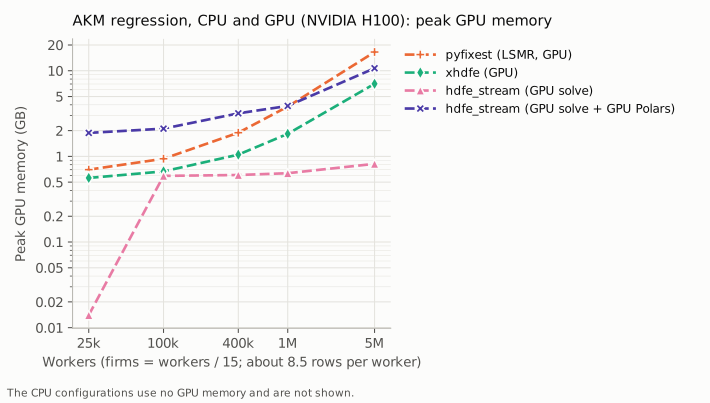
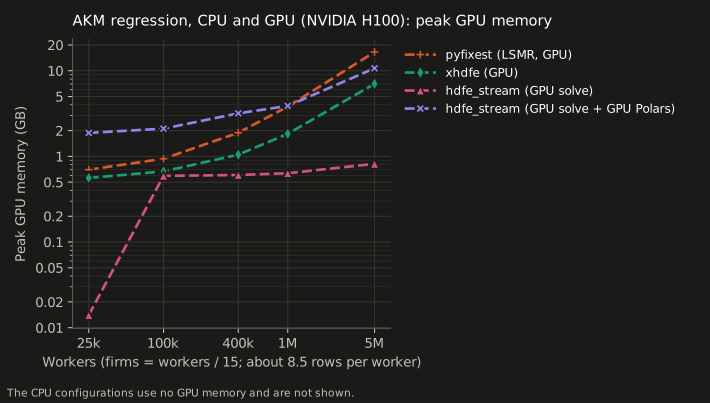
At 1 and 5 million workers (memory: the process’s peak, then the GPU’s):
configuration |
1M workers |
5M workers |
|---|---|---|
hdfe_stream, CPU |
6.2 s, 4.1 GB |
28.9 s, 7.8 GB |
hdfe_stream, GPU solve |
6.5 s, 4.7 + 0.6 GB |
28.8 s, 8.5 + 0.8 GB |
hdfe_stream, GPU solve and GPU Polars |
8.6 s, 4.5 + 3.9 GB |
27.7 s, 6.9 + 10.7 GB |
pyfixest (LSMR), CPU |
10.2 s, 4.8 GB |
77.2 s, 21.3 GB |
pyfixest (LSMR), GPU |
10.9 s, 5.2 + 3.8 GB |
54.8 s, 20.6 + 16.5 GB |
xhdfe, CPU |
13.4 s, 5.0 GB |
107.2 s, 19.3 GB |
xhdfe, GPU |
4.2 s, 3.1 + 1.8 GB |
24.4 s, 12.7 + 7.0 GB |
Reading the HDFE regression figures
hdfe_stream gains little from the GPU, and only at the largest size. Its
design keeps the solve small: the rows are reduced to sums over worker-firm
cells before solving, so at 5 million workers the solve is 3.5 of 29 seconds
on the CPU, and on the GPU it took 3.5. Moving the Polars queries to the GPU as
well saved 1.2 seconds there (4%) and 0.9 GB of host memory, with the data held
in 10.7 GB of GPU memory instead. Up to a million workers the solve itself was
no faster on the GPU, and with the Polars queries on the GPU too the whole fit was
slower, by up to 3 seconds on the smallest panels, where starting the GPU engines costs
more than they save. Two of the fit’s Polars queries run on the CPU even then,
as diagnostics["polars_gpu_fallbacks"] reports: cudf-polars does not yet
support the approximate distinct count in pass 0’s scan, or the partitioned
write that follows it.
pyfixest’s PyTorch backend helps only at the largest size. At 5 million workers it took 55 s against 77 s on pyfixest’s CPU backend (29% less), with 16.5 GB on the GPU. At a million workers and below it was slower: 10.9 s against 10.2 s at a million, and 3.8 s against 0.8 s at 25,000. pyfixest describes the backend as experimental.
xhdfe gains the most: its CUDA backend is 3 to 4.4 times as fast as its CPU backend from a million workers up, and the fastest configuration on this machine from 100,000 workers up. At 5 million workers it took 24.4 s, against 28.9 s for hdfe_stream on this machine’s CPU and 27.7 s with both of hdfe_stream’s GPU options, with 12.7 GB of host memory and 7.0 GB on the GPU.
Plain regressions: OLS, IV and logit
The finding above is for fixed-effects regressions, where hdfe_stream reduces
the rows to cell sums before solving. A plain OLS, 2SLS or logit has no such
reduction, so the same question was asked of those, on the same kind of
machine (a p5.4xlarge, one NVIDIA H100) and the data of the OLS, IV, logit
and probit benchmarks: 10 covariates, no fixed effects, 100,000
to 20 million rows. Each library is also run on the CPU of this machine, which
is older and slower than the CPU machine of the other pages, so only the
comparisons within this page are meaningful.
python benchmarks/general_gpu_benchmark.py # on a machine with an NVIDIA GPU
The numbers are in
benchmarks/results/general_gpu.csv.
The configurations are hdfe_stream on the CPU; with polars_engine="gpu"; and,
for logit, with device="cuda", which runs every IRLS step on the GPU after
uploading the rows once (see using the GPU options),
and with both. The others are the fastest CPU library for each model
(polars-ols, polars-ds); cuML’s
LinearRegression and LogisticRegression, which have no 2SLS; and the normal
equations, 2SLS and Newton’s method written in CuPy, as about the least work
the GPU can be given. GPU times include copying the data to the GPU. All
configurations agree on the coefficients to within 2.3e-13 (OLS and IV) and
4.5e-8 (logit).
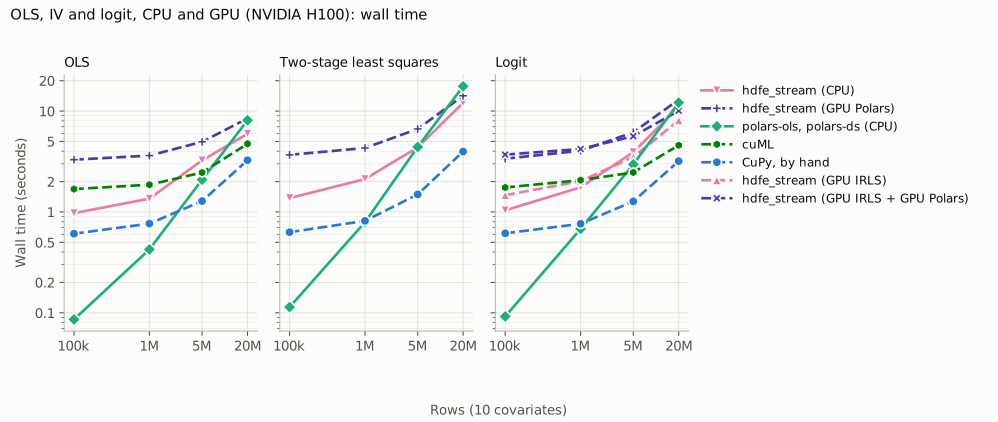
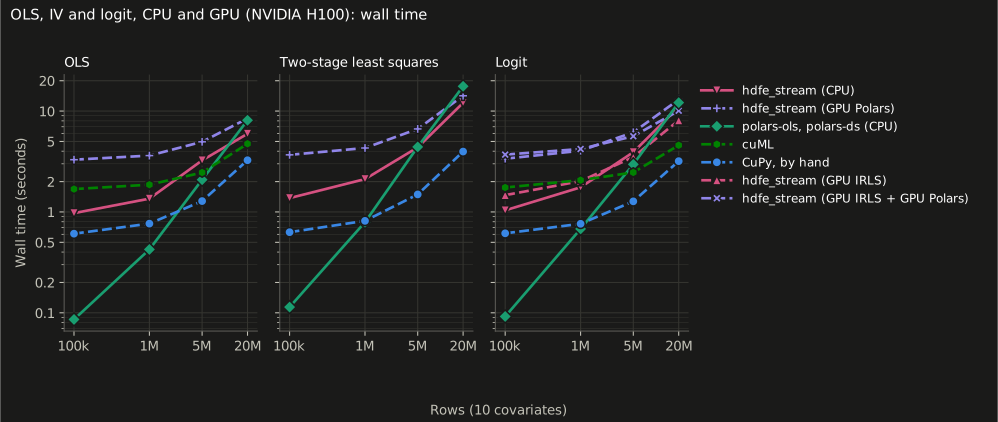
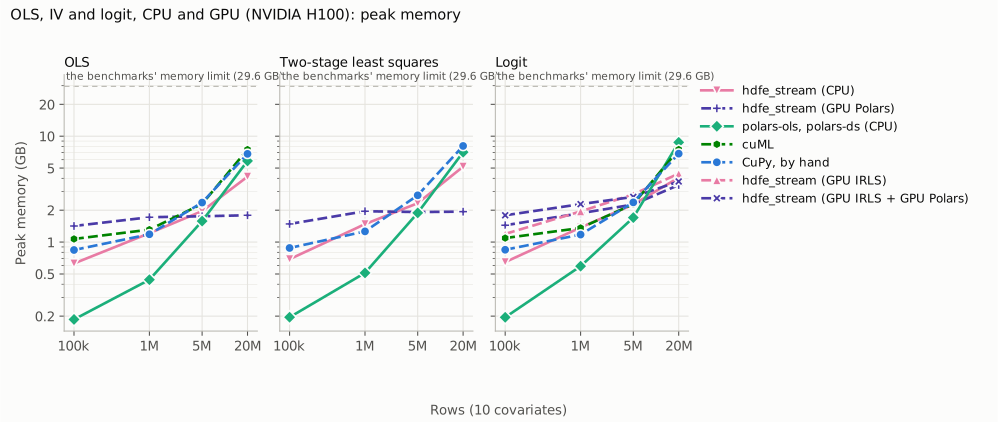
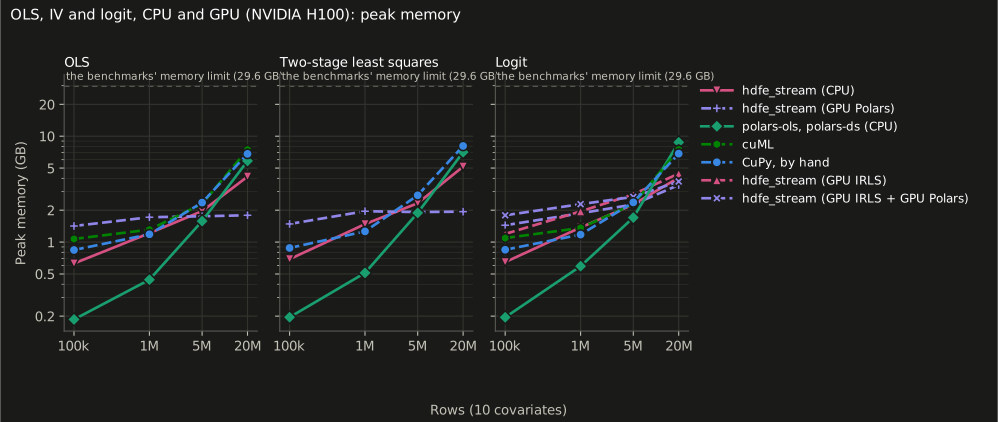
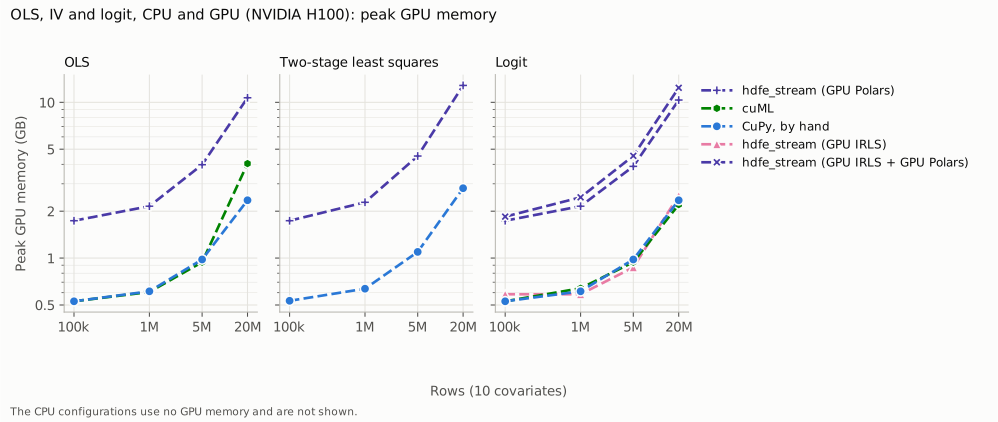
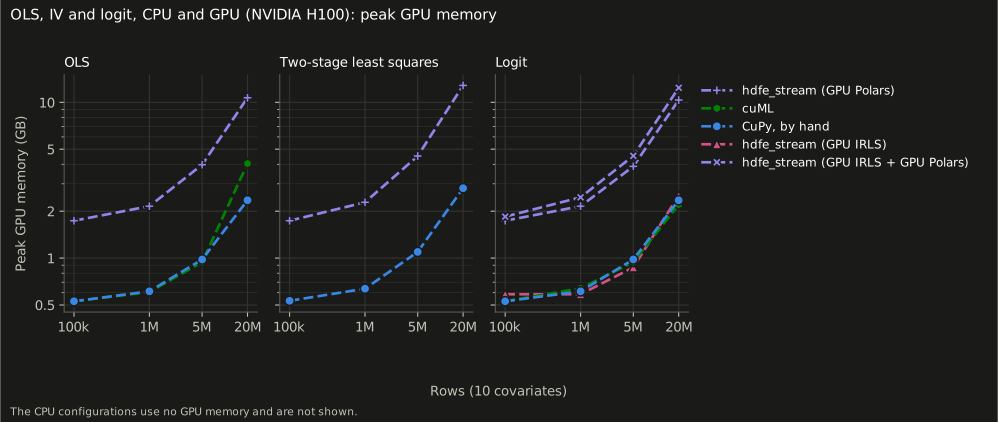
Wall time:
configuration |
100,000 rows |
1 million |
5 million |
20 million |
|---|---|---|---|---|
hdfe_stream OLS (CPU) |
1.0 s |
1.4 s |
3.2 s |
6.0 s |
hdfe_stream OLS (GPU Polars) |
3.3 s |
3.6 s |
5.0 s |
8.5 s |
polars-ols (CPU) |
0.1 s |
0.4 s |
2.1 s |
8.1 s |
cuML OLS |
1.7 s |
1.9 s |
2.5 s |
4.7 s |
CuPy normal equations (OLS) |
0.6 s |
0.8 s |
1.3 s |
3.3 s |
hdfe_stream IV (CPU) |
1.4 s |
2.1 s |
4.4 s |
12.1 s |
hdfe_stream IV (GPU Polars) |
3.7 s |
4.3 s |
6.7 s |
14.2 s |
polars-ols two stages (CPU) |
0.1 s |
0.8 s |
4.4 s |
17.6 s |
CuPy 2SLS |
0.6 s |
0.8 s |
1.5 s |
4.0 s |
hdfe_stream logit (CPU) |
1.0 s |
1.8 s |
3.9 s |
11.0 s |
hdfe_stream logit (GPU IRLS) |
1.5 s |
2.0 s |
3.5 s |
8.1 s |
hdfe_stream logit (GPU Polars) |
3.4 s |
4.0 s |
6.2 s |
13.0 s |
hdfe_stream logit (GPU IRLS + GPU Polars) |
3.7 s |
4.2 s |
5.6 s |
10.1 s |
polars-ds logit (CPU) |
0.1 s |
0.7 s |
3.0 s |
12.1 s |
cuML logit |
1.7 s |
2.1 s |
2.5 s |
4.6 s |
CuPy Newton logit |
0.6 s |
0.8 s |
1.3 s |
3.2 s |
A GPU does help plain regressions, unlike the fixed-effects one, but not hdfe_stream’s linear fits. At 20 million rows cuML fits OLS in 4.7 s and logit in 4.6 s, and the CuPy versions take 3.2 to 4.0 s, against 6.0 s for hdfe_stream OLS, 12.1 s for IV and 11.0 s for logit on the CPU: gains of 1.3 to 3.4 times. Below about 5 million rows the CPU libraries are faster.
polars_engine="gpu"made hdfe_stream slower at every size and in every model, by 1.2 to 3.4 times, and held up to 13 GB of GPU memory. An OLS or 2SLS fit has no solve to move, so its time goes to reading and writing rows in Polars, which is the part this option moves.device="cuda"helps logit at large sizes. It took 8.1 s at 20 million rows against 11.0 s on the CPU (26% less), 3.5 s against 3.9 s at 5 million, and was slower at 1 million rows and below. With the Polars engine as well it was slower than withdevice="cuda"alone. Only the IRLS steps move: the other passes (scanning and writing the rows, and the final pass for the standard errors) still run on the CPU, which is probably why the fit stays well behind cuML and CuPy; we did not profile it.The cost. A GPU fit still has to read the data: CuPy and cuML fit 20 million rows in 3 to 5 s, and fixest on the CPU machine of the other pages fits the same OLS in 2.9 s, which costs about an eighth as much per hour. glum fits the logit in 4.2 s. A GPU pays when the data are already on the card, or the fit is repeated; for a one-off fit it does not, here.
Each point is one run, and the CPU rows are on this machine’s CPU, not the other pages’. cuML 26.06 ran in an environment of its own (NumPy below 2.4). Polars was 1.39.3, as for the GPU benchmark above.
Should I use a GPU?
For this problem, the evidence here says probably not. A GPU-first HDFE library
gains a lot from the GPU, but against its own CPU path; against a CPU-first one
the gain is small, and the GPU machine costs far more. In the
AKM benchmark, on a 16-vCPU CPU machine (a c8id.4xlarge),
hdfe_stream fitted 5 million workers in 23 s and 3.9 GB. That is as fast as
xhdfe on the H100 (24 s, and 12.7 GB of memory plus 7.0 GB on the GPU), on a
machine that costs about an eighth as much per hour: \(0.89 an hour on demand,
against \)6.88 for the p5.4xlarge, AWS’s smallest H100 machine.
If you want to try a GPU yourself:
For hdfe_stream, expect modest gains, and only on large problems. The options are experimental, and on this benchmark they paid off only at the largest size, by about 4%.
If GPU performance is the priority, a GPU-oriented library such as xhdfe is the better choice. Its CUDA backend made the most of the card here.
The GPU needs fast double precision. These fits run in float64, which is fast only on data-center GPUs (A100, H100, B200); consumer and inference cards run it at a small fraction of their single-precision speed.
Using the GPU options
Both are experimental, and both leave the estimates unchanged: they agree with the CPU’s to within the solver tolerance.
pip install cupy-cuda13x cudf-polars-cu13 # or the builds for CUDA 12
fit = feols_stream(fml, "panel.parquet", device="cuda", polars_engine="gpu")
device="cuda"builds the reduced system on the CPU as usual, copies it to the GPU once, and runs the conjugate-gradient iterations there. It needssolver="auto"or"explicit"; if S does not fit in the memory left, the solve falls back to the CPU, as it would without a GPU.For a logit, probit or Poisson without fixed effects there is no solve to move, and
device="cuda"instead uploads the rows once and runs every IRLS step there, as long as they fit in the device’s free memory (otherwise it warns and uploads them again at each step). It helped only above about 5 million rows (see plain regressions). OLS and 2SLS have no GPU path of their own.polars_engine="gpu"sends the fit’s Polars queries to cudf-polars, and runs any query the engine cannot on the CPU instead.cudf-polars supports a narrow range of Polars versions (version 26.6 needs Polars 1.39), so installing it can change your Polars version.
How it was measured
On an AWS EC2 p5.4xlarge: one NVIDIA H100 (80 GB), 16 vCPUs of an AMD EPYC
7R13, NVIDIA driver 595.112 (CUDA 13.2), and the instance’s local NVMe drive for
the data. The benchmarks were limited to 29.6 GB of memory, as on the CPU
machine, so that every configuration had the same room as there. This was
hdfe_stream 0.10.0 and pyfixest 0.70.0, measured on 2026-11-09. Python and its packages were those of the other benchmarks, except Polars
1.39.3, which cudf-polars 26.6 needs (2.0.0 elsewhere), with CuPy 14.2.0,
cudf-polars 26.6.0 and, for pyfixest’s rows, PyTorch 2.15.0 (CUDA 13.0). The
CPU numbers here are therefore not those of the other pages: this is a
different, older CPU, with an older Polars, and hdfe_stream took 29 s at 5
million workers here against 23 s there.
Peak GPU memory is the configuration’s process’s, polled from
nvidia-smi. Each configuration runs in a fresh process, so the GPU ones pay for starting CUDA each time, as a script would. What is compiled once and cached is not charged: numba’s, CuPy’s and cudf’s kernels, and pyfixest’storch.compile, are warmed up on the smallest panel first.pyfixest silently falls back to a CPU demeaner if PyTorch is missing, so a GPU result is kept only if PyTorch saw the GPU and the fit allocated memory on it.
xhdfe is commit
f71420b(2.28.1) built withXHDFE_ENABLE_CUDA=ON, with one change: its source callscub::Max, which the CUDA 13 toolkit removed, and the build replaces it withcuda::maximum<>{}, the same operation. Its result is kept only if xhdfe reports that it used the GPU.Each point is one run.